
How far is the Moon
Counter · diagram
The distance to the Moon counted out in Earths, side by side.
Type a line or upload a PDF. Knobly Studio turns your text into a finished, animated video: script, scenes, voice-over, captions and every format. You approve each step.
Press the arrow to request a demo of the studio making this video.
Most video tools hand you an empty timeline and wish you luck. Knobly Studio starts from what you want to say, and builds the video around it, one scene at a time.
First, the script · Text or PDF to video
Write a line or two. Or just upload a document or paste a link, and the studio writes the brief and fills in the details for you.
Narration, on-screen text and a visual plan for every scene.
Change any line you like. Nothing is animated until you say so.
Then, the scenes · Animated charts and maps
Animated charts from your numbers, maps, diagrams and type: a data story drawn for this video, not picked from a template.
YouMake the bars thicker and show the year.
StudioDone. Scene 2 is ready to watch again.

 Scene 1✓Scene 2✓Scene 3✓Scene 4✓
Stills from scenes made in Knobly Studio
Then, the sound · AI voice-over
An AI voice-over in American English, Hindi or another Indian language, captions timed to the spoken words, and music underneath.
Send money in two seconds, with nothing but an ID.
Finally, the files · Reels, Shorts and YouTube
Every scene is laid out again for wide and for tall, so nothing is cropped: 16:9 for YouTube, 9:16 for Instagram Reels and YouTube Shorts, plus 4:5, square, and a small file for WhatsApp.


One scene from a Knobly Studio sample, drawn by the studio in each shape
Captions as SRT and VTTThumbnailsYour logo and end cardWhatsApp-size file
Sample explainer videos · ten seconds each · rest on one to play it
Counter · diagram
The distance to the Moon counted out in Earths, side by side.
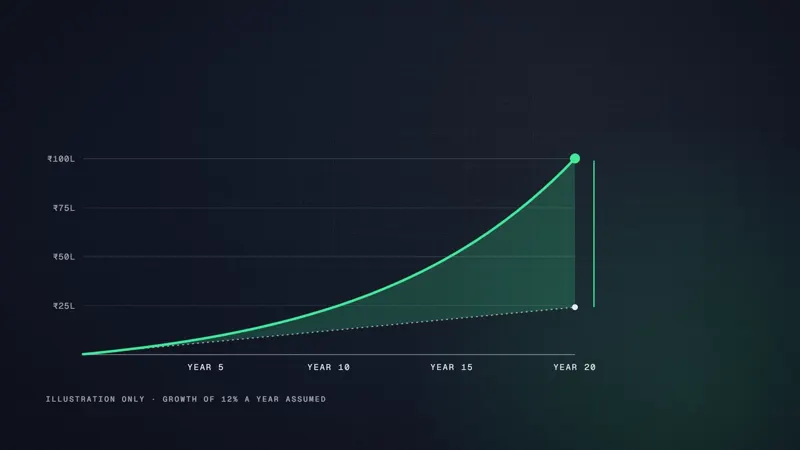
Line chart
A line chart showing how steady growth compounds over twenty years.
World map · routes
Routes drawn across a dotted world map from Bengaluru to five cities.
Bar chart race
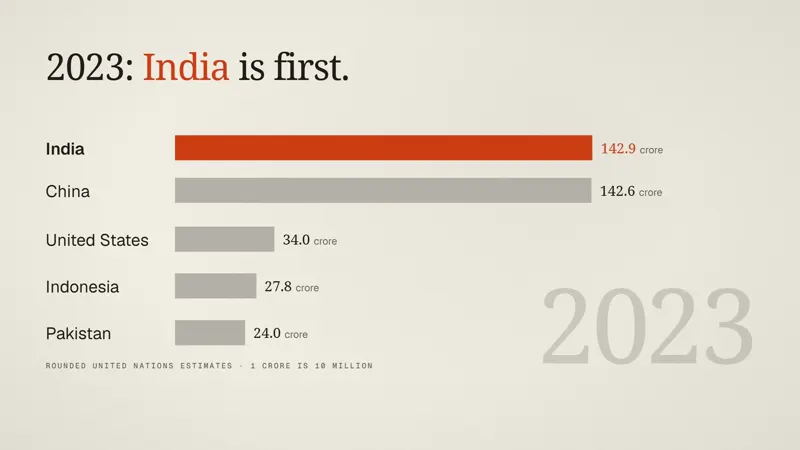
A bar chart race of the world's most populous countries.
Donut chart
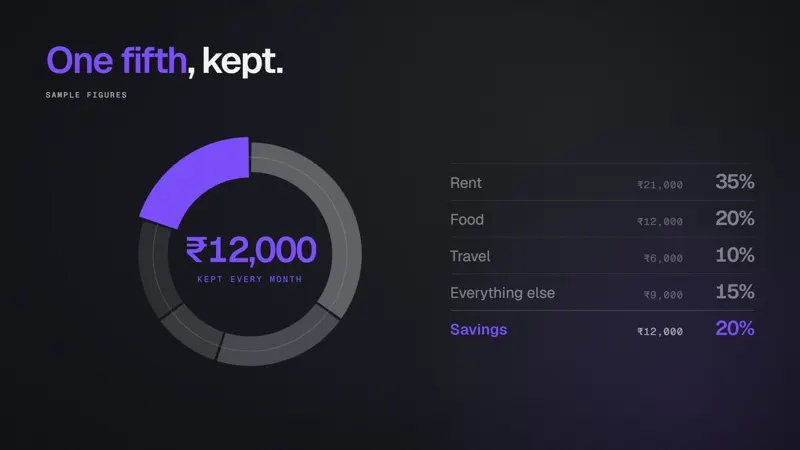
A monthly budget as a donut chart, with the savings share picked out.
Dot grid
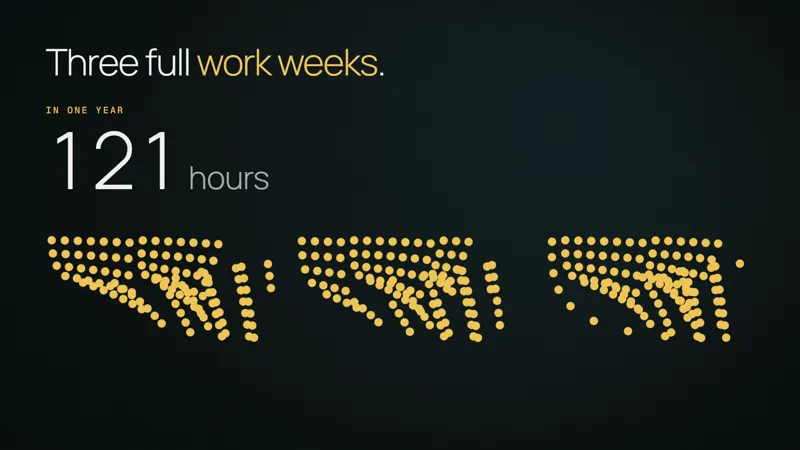
Hours lost in a year, shown as a grid of dots.
Next
Tell us what you want to make and watch the studio make it.
Request a demoWhat it is for · AI video generator for business
Turn an idea, a process or a policy into a clear 60-second animated explainer.
Show what is new and why it matters, in your brand's colours.
Animated charts and maps drawn from your own numbers.
Give it a PDF, a deck or a web page. It finds the story and writes the script.
The same video in the right shape for Instagram Reels, YouTube Shorts, feeds and WhatsApp.
Quick answers
Knobly Studio is an AI video maker for business, built for explainer videos. You describe the video you want in a line or two, or simply upload a document and it writes the brief for you. It then writes the script, draws and animates every scene, records the voice-over, adds captions and music, and exports the video in every format. You review and approve each step.
Teams that need clear videos and have no video editor to spare: marketing and communications teams, founders and product teams launching something new, finance and policy teams explaining numbers, educators, and agencies making videos for clients. If you can say the message in a few lines, or you have a document that says it, you can make the video.
In five steps. You write a short brief, or just upload a document or paste a link, and the studio writes the brief for you and suggests the audience, style, voice and other details. It then writes a scene-by-scene script, which you approve. It draws and animates each scene for you to review. It adds the voice-over, captions and music. Finally it exports every format.
No. You describe what you want and react to what you see. To change a scene, you say what to change in plain words.
A few lines of text, or your own material: PDF, Word, PowerPoint and Excel files, web pages and YouTube links. From your material the studio writes the brief for you, using only the facts it finds there. You can also bring a script you have already written.
Yes. Upload a PDF, Word, PowerPoint or Excel file, or paste a web page or YouTube link. The studio finds the story, writes the brief and the script, and makes an animated explainer video from it, using only the facts in your material.
Neither. Each scene is motion graphics drawn and animated for your script: charts, maps, diagrams and type. Text stays sharp, figures come from what you provide, and the look stays consistent from the first scene to the last.
Three ways. It starts from your message, not from a template or a timeline. Every scene is drawn and animated for your script, with no avatars and no stock footage. And you approve the script and each scene before anything is final, so the video says what you meant.
The voice-over can be in American English or in an Indian language: Hindi, Kannada, Tamil, Telugu, Malayalam, Marathi, Bengali, Gujarati, Punjabi and Odia. Captions follow the language of the video.
Yes. Your logo, your colours and your end card are applied to every video.
Yes. Ask for the change in plain words and only that scene is redone. Approved scenes are left untouched.
Yes. Every video comes in 9:16 for Reels, Shorts and WhatsApp Status, as well as 16:9 for YouTube and your website, 4:5 and 1:1 for feeds. Each scene is laid out again for each shape, so nothing important is cropped.
The finished video in 16:9, 9:16, 4:5 and 1:1, a smaller file for WhatsApp, caption files (SRT and VTT) and thumbnails.
Request a demo. We will show Knobly Studio working on a video you describe, and go through pricing with you.
Tell us what you want to make. We will show you Knobly Studio working on it.